KultureCity
- 4.6
- Rating
- 10.00K
- Installs
- Free
- Price

 Analysis by App-foxy
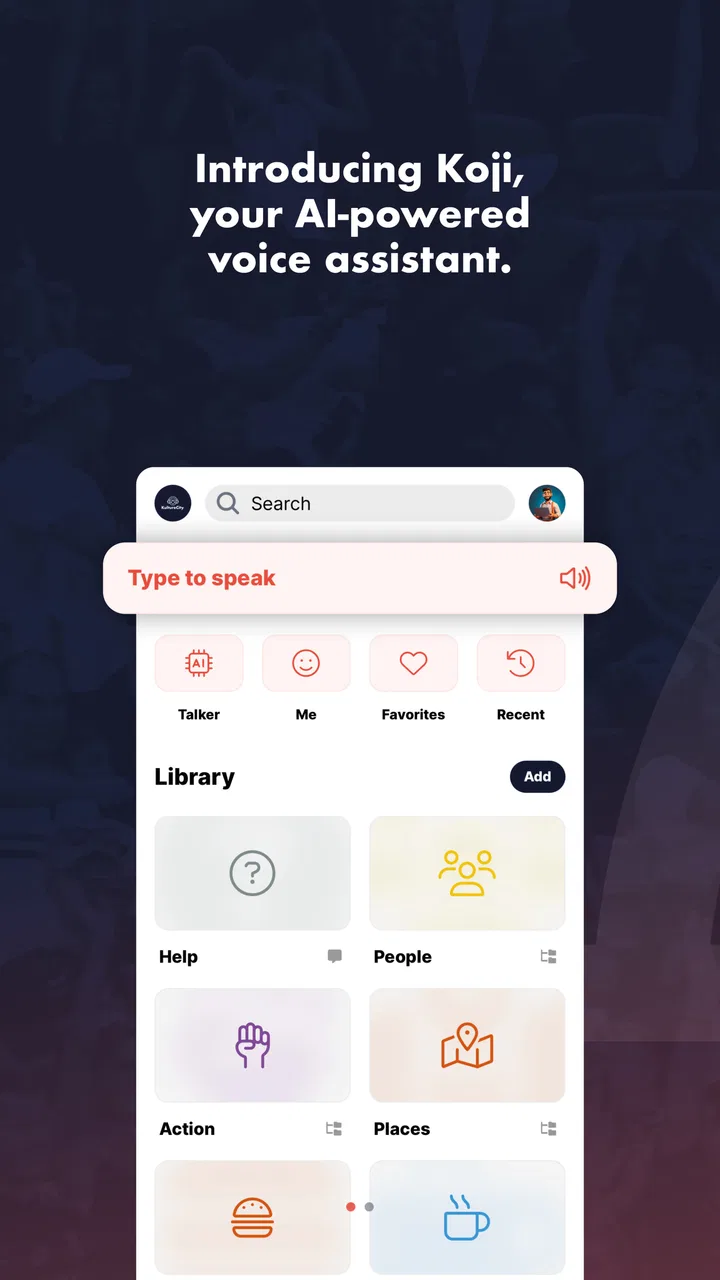
I approached KultureCity as a practical parenting app rather than as something to browse casually. Its purpose is unusual: it presents itself as an AI talker and conversation app, and it is designed to be used when spoken communication is difficult, unavailable, or simply not the best option. That immediately makes the decision less about entertainment and more about fit. The right question is not whether it replaces every communication tool, but whether its style of interaction suits the person who will use it.
In my experience, that distinction matters. A parent may be looking for a way to support a child who needs help expressing a request, answering a question, or participating in a short exchange. Another family may want a lightweight communication aid that can be kept ready on a phone. Those are very different expectations from someone searching for a full speech-support system, a language-learning app, or a general-purpose voice assistant.
The app is free, aimed at Everyone, and comes from KultureCity, a developer associated with accessibility-focused experiences. It has a 4.6 average from around 165 ratings and has passed 10K installs, which gives it a modest but meaningful presence for a specialized parenting tool. I would treat that reception as encouraging rather than conclusive: the strongest reason to try it is the specific communication need it may address.
You May Also Like

 Pandora - Music & Podcasts
Pandora’s Music Is Easy to Start, but Harder to Recover
Pandora’s strength is its low-effort path from a seed to a station. Its weak spot is how much confidence it asks you to place in connection, setup, and quiet recovery.

 AccuWeather: Weather Radar
AccuWeather Review: A Quick, Clear Forecast for Everyday Decisions
For everyday plans, the best forecast is the one you can understand quickly. AccuWeather makes rain timing, radar, and local conditions easy to act on, with a few trade-offs.

 Hill Climb Racing
Why Hill Climb Racing Still Turns Crashes Into One More Run
A tiny car, a bumpy hill and one more upgrade: Hill Climb Racing keeps resurfacing because its simple chaos makes every near-miss feel personal.

 AliExpress - Shopping App
AliExpress Makes Global Shopping Feel Personal, but Shoppers Bear the Risk
AliExpress turns a global marketplace into a pocket-sized discovery engine. Its reach is useful, its shopping loop compelling, and its trade-offs easy to miss.

 Lords Mobile: Kingdom Wars
Lords Mobile Is a Kingdom-Building Routine, Not a Quick Match
A case-by-case verdict on the building, battles, device demands, and social commitments that make Lords Mobile rewarding for some players and exhausting for others.

 PDF Scanner app - TapScanner
TapScanner Makes Paperwork Easier to Capture, Check, and Share
TapScanner makes scanning with a phone feel less like a rescue operation and more like a dependable step in getting work done. Its capture tools are useful, though not flawless.
More From Our News Desk
View All News


How I Would Decide Whether It Fits
Before installing it, I would first identify the exact moment when communication breaks down. Is the person unable to speak, reluctant to speak, still developing language, overwhelmed in busy places, or more comfortable selecting words than producing them aloud? Writing down two or three common situations is useful because it prevents the app from being judged against an unrealistic standard.
For example, a child might need to communicate “I want water,” “stop,” “help me,” or “I need a break.” A parent may also want to support a short back-and-forth conversation without constantly guessing. Those are concrete tests. If the app makes those exchanges easier, it has practical value even if it is not a complete communication system.
I would also consider who will operate the phone. Some children can make selections independently, while others need an adult to guide the interaction. That difference affects the experience more than the store summary does. An app can be useful as a shared tool between parent and child, but it may feel limiting if the user needs independent access to a large, carefully organized vocabulary.
Another decision point is the environment. At home, there is usually time to open an app, locate a phrase, and repeat it if necessary. In a supermarket, classroom, waiting room, or crowded venue, every extra step becomes more noticeable. I would test the app in the actual places where communication is most difficult instead of assuming that a smooth home trial guarantees the same result outside.
The current release is version 6.1.10 and works on devices running Android 6.0 or later. That makes it accessible to people who keep an older Android phone available for a child or family member. Still, device age can affect responsiveness, screen readability, and battery life, so I would test the exact phone rather than relying only on the operating-system requirement.
A useful first test at home
My preferred setup would be a short, calm trial with a small set of everyday requests. I would choose phrases that matter during meals, dressing, travel, and moments of discomfort. Then I would let the intended user try them without immediately taking over. This reveals whether the navigation is understandable, whether the wording feels natural, and whether the communication partner recognizes the output quickly.
One non-obvious benefit of this approach is that it separates app problems from routine problems. If a phrase is hard to find, the issue may be the organization of the available conversation choices. If the user succeeds only when a parent prompts every step, the app may work better as a supported aid than as an independent one. That is valuable information before the family begins depending on it.
I would also observe what happens after the first successful exchange. Does the user want to repeat the same phrase? Do they try to express something different? Does the parent naturally pause long enough for the app to become part of the conversation? These details show whether the tool encourages participation or merely becomes a button that adults operate on someone’s behalf.
Where it makes a strong case
The clearest strength is its focus. KultureCity is not asking parents to turn a general smartphone into a complicated project. It offers a dedicated place for talker-style communication, which can reduce the awkwardness of improvising with notes, typing, gestures, or a regular voice assistant.
That matters during a realistic everyday situation. Imagine a child becoming uncomfortable during a family outing. Speaking may be difficult at that moment, and a parent may not want to ask repeated questions in front of other people. A ready communication app can give the child a way to indicate a need while allowing the adult to respond without turning the situation into an interrogation. The value is not dramatic technology; it is a little more control during a stressful exchange.
I also like the fact that the app is free. Families can test it without adding a purchase decision to an already sensitive choice. Free access is especially helpful when the user’s needs are still being understood. A parent can see whether a talker-style interface is accepted, whether it is used consistently, and whether it deserves a more specialized companion tool later.
The app’s parenting category is appropriate because the adult’s role is important. I would not hand it over and assume the problem is solved. The best results are likely to come when parents, caregivers, or teachers model patience, wait for a response, and treat the selected message as genuine communication rather than as a shortcut.
The biggest practical win is giving a person another route into a conversation when speech is not working. That route can be useful even when it is used only occasionally. A communication aid does not need to replace speech to be worthwhile; it can support the moments when speech becomes tiring, inaccessible, or emotionally difficult.
Small habits that improve the experience
I would keep the phone charged and easy to reach, rather than searching for it only after a problem begins. A communication tool that is buried in a bag may be technically available but practically absent. A simple home-screen position or a dedicated device can make a greater difference than repeatedly explaining how important the app is.
I would also practice with communication partners, not just with the intended user. Grandparents, babysitters, and activity leaders should understand that the app is part of the conversation. They need to look at the person, wait for the message, and respond normally. Otherwise, the user may be technically able to communicate but still feel ignored.
A further tip is to avoid treating every interaction as a test. If the child uses the app for a playful choice, a greeting, or a familiar request, that practice can build comfort without pressure. The goal is to make the tool available across ordinary moments, not to bring it out only when an adult is already worried.
Where another category may be better
KultureCity may not be the right choice for someone who needs a highly customizable augmentative and alternative communication system. Some users require extensive vocabulary, personalized layouts, symbol-based navigation, detailed voice settings, or professional configuration. In those cases, a specialist AAC solution may be a better long-term fit, even if it takes more time to learn and may involve costs that this free app avoids.
It may also be a poor match for a person who mainly wants typed communication. A notes app, messaging app, or text-to-speech utility can be more flexible when the user prefers composing full sentences, keeping written records, or communicating with someone who is not physically nearby. KultureCity makes more sense when the desired interaction is quick, direct, and conversation-oriented.
General voice assistants are another alternative, but they solve a different problem. They are useful for commands, information, reminders, and device control. I would not choose one as the primary communication aid for a child who needs deliberate control over what is expressed. The convenience of speaking to an assistant does not automatically provide the same sense of ownership as selecting a message for another person.
Visual schedules and picture cards can still be better in some settings. They work without a battery, can be placed exactly where a routine happens, and may be easier for a person who finds a phone distracting. On the other hand, they are less convenient when the family moves between locations. The choice depends on whether portability or simplicity is the bigger priority.
For families comparing options, the trade-off is straightforward. This app is appealing when low cost, quick access, and a conversation-centered approach matter most. A specialized system is more suitable when communication needs are broad, highly individualized, or expected to become a central daily method. Neither choice is automatically superior; they serve different levels of support.
What switching will actually involve
Moving from gestures, typing, or picture cards to a talker app is not instant. The family has to learn where useful messages are found, decide when to offer the phone, and give the user enough time to respond. That learning curve is easy to underestimate because adults often understand an interface faster than children do.
I would introduce it alongside the existing method instead of removing familiar supports on the first day. If the app is unavailable, misunderstood, or too slow in a particular moment, the person should still have another way to communicate. This gradual approach also reveals which situations genuinely benefit from the app and which are better served by a simpler option.
There is a social cost to switching as well. A new device-based communication method can attract attention, especially in public. Parents can reduce that pressure by using it naturally at home and by teaching regular communication partners how to respond. The aim is to make the app ordinary, not to make the user feel responsible for explaining it every time.
I would review the experience after a week of normal use, focusing on actual outcomes rather than enthusiasm on the first day. Which requests were completed? Were misunderstandings reduced? Did the user initiate communication, or did adults prompt every message? Did the phone help during difficult moments, or was it mostly left untouched? Those answers are more useful than a simple yes-or-no judgment.
Because the app is free, trying it carries little financial risk, but time and expectations still matter. If a family needs a comprehensive communication plan, an informal trial should not delay professional guidance. The app can be one tool in that plan, but it should not be treated as a substitute for understanding the user’s broader needs.
My recommendation for different families
I would recommend KultureCity to parents who want to explore a free, focused conversation aid, especially when the immediate goal is giving someone another way to express basic needs or participate in short exchanges. It is also worth considering for families who want a portable option to use alongside existing communication methods.
I would be more cautious if the user needs extensive customization, independent communication across many subjects, or a system that has been carefully configured for long-term daily use. In that situation, I would compare it with specialist AAC products and involve the people who already support the user. The fact that this app is easy to try does not mean it will meet every communication requirement.
Its Everyone age rating makes it approachable for family use, and the free price removes a common barrier to experimentation. The 4.6 average and 10K-plus installs suggest that other users have found enough value to engage with it, though I would still judge it by the person’s real behavior rather than by popularity alone. A communication aid succeeds when it helps one particular person be understood.
After using it as a decision guide rather than expecting it to do everything, my view is positive but measured. KultureCity has a clear place between improvised communication and more demanding specialist systems. If you need a simple, no-cost way to open a conversation when speech is unavailable or difficult, it is a sensible first app to try. If your needs extend into a fully personalized communication system, use it as an experiment or companion rather than assuming it is the final answer.
The most important step is to test it with real phrases, real people, and real routines. Give the user time, keep another communication option available, and pay attention to whether the app increases independence instead of merely making adults feel prepared. That is the standard I would use, and on that basis, KultureCity is a worthwhile starting point for the right family.
For Android users, the current version is 6.1.10 and requires Android 6.0 or newer. It was released on April 5, 2018, and remains free to try, making the practical decision fairly simple: install it, test it in a calm setting, then decide whether its conversation-focused approach genuinely improves communication for the person who matters most.
FAQs for KultureCity
01What is KultureCity and what does it offer?
KultureCity is an app designed to promote accessibility and inclusivity for individuals with sensory needs. It offers features like a sensory-friendly map that highlights accessible locations, event information, and helpful resources for families and individuals. The app aims to create a more inclusive environment for those with sensory sensitivities.
02How does KultureCity assist individuals with sensory sensitivities?
KultureCity provides resources such as sensory-friendly location maps, sensory toolkits, and event notifications. These features help individuals and families plan outings with confidence, knowing they can access environments that accommodate sensory needs. The app also shares tips and strategies for managing sensory overload.
03Is KultureCity available for both Android and iOS devices?
Yes, KultureCity is available for download on both Android and iOS platforms. Users can easily find the app on the Google Play Store for Android devices and the Apple App Store for iOS devices, ensuring broad accessibility for all users seeking its inclusive resources.
04Does KultureCity require a subscription or payment to access its features?
KultureCity is free to download and use. The app is designed to be accessible to everyone, offering its resources and tools without a subscription fee. Users can fully explore the app’s features without any cost, making it widely accessible for those who need it.
05How does KultureCity ensure the accuracy and reliability of its sensory-friendly locations?
KultureCity collaborates with a network of partners and organizations to verify and maintain an updated list of sensory-friendly locations. The app encourages user feedback and regularly updates its database to ensure the information is current, reliable, and beneficial for its community of users.
Pros
- User-friendly interface for seamless navigation.
- Wide range of customizable sensory profiles.
- Real-time alerts for sensory-friendly events.
- Detailed venue maps enhance accessibility.
- Community support and resources available.
Cons
- Limited venue coverage in some areas.
- Requires internet for full functionality.
- Occasional app crashes reported by users.
- Updates can be slow to implement changes.
- Some features may require in-app purchases.

KultureCity
Gallery